How to Make money with google adsense with your WordPress Website: A Step-by-Step Guide

One of the simplest ways to turn your WordPress website traffic into revenue is through Google AdSense, provided your website draws in visitors.
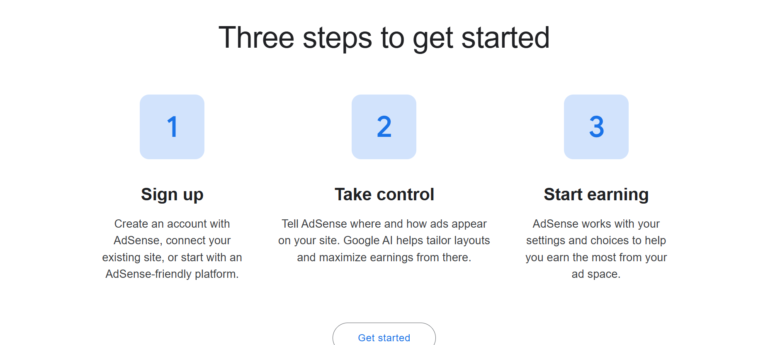
Through AdSense, website owners and publishers can display ads from Google’s network; you earn money when Google’s visitors see or interact with these ads, according to AdSense’s payment model and depending on how much advertisers are willing to pay. How AdSense works
The good thing is that there’s no need for you to sell your products, get in touch with advertisers one by one, or set up your own advertising sales team; once your site has been approved and the AdSense code has been correctly installed, Google will automatically look after a number of the aspects of ad delivery.
Simply installing AdSense does not guarantee substantial income; your earnings will vary based on factors such as traffic volume, visitor location, content topic, advertiser demand, ad placement, and user engagement.
The following guide shows you how to earn money from your WordPress website using Google AdSense. You’ll find out how to get your site ready, how to apply for AdSense, how to install the code, which ad placements to choose, and how to increase your income.
What Is Google AdSense?

Google AdSense is an advertising program that allows publishers to show ads on their websites.
Google matches advertisements to your content and audience, while you provide the ad space. (How AdSense works, n.d.)
You are given two choices with AdSense: automated ads and manual ads. With automated ads, Google decides where ads appear on your site, whereas with manual ad units you choose precisely where they appear.
Which is why AdSense is popular among bloggers, publishers, information websites, and other content creators who wish to earn money from their current traffic.
How Does AdSense Make Money for Website Owners?
Here’s how it works in simple terms:
Here’s useful content: attract visitors, Display relevant advertisements, and visitors interact with eligible ads –and earn advertising revenue
The amount you earn depends not only on how many people visit your website.
Several factors can influence revenue, including:
- Number of page views
- Visitor location
- Content niche
- Advertiser competition
- Ad formats
- Device type
- User engagement
- Time of year
- Overall traffic quality
For instance, a website directed at business professionals in a market with many advertisers will earn different amounts than a general-interest site with the same traffic.
There’s no fixed sum that you receive for every visitor.
Step 1: Build a Quality WordPress Website
Before you apply for AdSense, ensure that your WordPress website is properly set up.
Google states that publishers should produce their own original and high-quality content that is able to attract an audience and adheres to the AdSense policies. (AdSense Program policies, 2026)
Your website should have:
- A professional design
- Original content
- Easy navigation
- Clear categories
- A working menu
- Fast-loading pages
- Mobile-friendly design
- A secure HTTPS connection
- A clear contact page
- A privacy policy
- Other relevant legal and informational pages for your audience
You don’t need to have a certain number of blog posts before you submit an application; what matters is that your website and content comply with Google’s requirements. (Google Publisher Policy 4)
Don’t apply if your website is nearly empty.
Make sure that the website you build is actually useful to your visitors.
Step 2: Choose a Profitable Content Niche
The advertising potential of your website can be greatly influenced by the niche it occupies.
Certain topics generate considerable commercial interest because companies compete to reach people actively researching products and services. (Bradley et al., n.d.)
Potential niches include:
- Personal finance
- Insurance
- Real estate
- Business
- Digital marketing
- Software
- Technology
- Education
- Travel
- Automotive
- Home improvement
- Health and wellness
- Careers
- Ecommerce
Yet don’t choose a niche merely because it pays well or doesn’t require advertisements.
Consider whether you can regularly produce accurate, useful, and original content on that subject.
A niche is good if it has audience demand, offers opportunities for producing useful content, and attracts advertisers.
Step 3: Publish Original, Helpful Content
Content is essential to having a successful AdSense website.
Google’s eligibility guidelines place particular emphasis on original, high-quality content. (Eligibility requirements for AdSense, 2026)
Write articles that answer real questions and provide information visitors can’t easily find elsewhere.
Examples include:
- How-to guides
- Tutorials
- Product comparisons
- Industry guides
- Educational articles
- Frequently asked questions
- Case studies
- Research-based articles
- Detailed explanations
- Buying guides
Do not put your website filled with copied content, low-quality automatically generated pages, or articles that are created merely to display ads.
Build an audience first and then focus on monetization.
Before you apply for AdSense, make sure to browse your website as if you are a first-time visitor. Is it possible for someone to quickly locate your main categories? Can visitors find your newest articles? Latest articles?
Can they contact you?
Do they understand the subject of your website?
Make your website navigation simple.
For example:
Home | Business | Finance | Technology | Reviews | About | Contact
You can tailor the structure to your particular niche.
A well-organized website enables both visitors and search engines to understand your content.
Step 5: Create the Essential Website Pages
Requirements may differ depending on the situation and jurisdiction, but professional websites should include appropriate transparency and legal pages. (11 Legal Requirements for Websites & Tips For Compliance, 2024)
Consider creating:
About Page
Describe the purpose of your website and tell us who is responsible for the content.
Contact Page
Provide visitors with a way to get in touch with you.
Privacy Policy
Explain how your website collects, uses, and handles personal information.
Terms and Conditions
State the general rules for using your website, where appropriate.
Affiliate Disclosure
You must make it clear when you’re using affiliate links that you have an affiliate relationship.
This gives your website a more professional, trustworthy appearance.
Step 6: Create Your Google AdSense Account
When your website is ready, you can register for AdSense.
You need a Google Account and eligible content, and Google also requires that applicants meet its age and program requirements.
Log in to the official Google AdSense website using your Google Account.
Google AdSense
Complete the registration process and provide the requested information.
Google may ask for information such as:
- Your name
- Contact information
- Website address
- Payment information
- Phone number
- Postal address
To get going, Google’s publisher guidelines state that a valid phone number and a postal address are required. (Make sure your payment address is valid – Google AdSense Help, 2026)
Step 7: Add Your WordPress Website to AdSense
Once you have made your account, please add your website.
As far as Google’s present instructions are concerned, you can add your site through the AdSense interface by choosing ‘Add site’ and then typing in your website’s URL. Then link the site and request a review. (Add a new site to your AdSense sites list, 2024)
Google will check whether it can access your website. The review generally takes a few days, though Google notes that in some cases it can take 2 to 4 weeks. (I sent my website for review, but it takes a few days and 2-4 weeks; in my case review time takes a long time, 2025)You shouldn’t assume you can begin displaying ads right after you apply.
You won’t be able to show AdSense ads until your site has been approved. (Eligibility requirements for AdSense, 2024)
Step 8: Connect AdSense to WordPress
Google offers several ways to connect your website.
One way is to include the AdSense code in your site’s HTML, usually in the header.
Google states that WordPress users can use methods compatible with WordPress when implementing the AdSense code. (Connect to AdSense and show ads on your WordPress site, 2026)
If you’re uncomfortable editing the website’s code, use a reliable WordPress method or a suitable plugin to insert the required AdSense code safely. (Insert ad unit code into your WordPress site, 2024)
Always follow Google’s current implementation instructions. After you’ve linked your site, ask for a review.r Google checks the whole site to make sure it complies with its policies.ueIn the meantime, continue to improve your website. Entire site for compliance with its policies. (Connect your site to AdSense, 2023)
While waiting, don’t stop improving your website.
Codon’te:
- Publishing useful articles
- Fixing broken links
- Improving navigation
- Checking mobile usability. If your application is not approved, review the reason Google provided and address the specific issue before requesting another review.
Step 10: Turn on Google AdSense Auto Ads
Once your account and website are activated, one of the easiest ways to begin is with
Google refers to Auto Ads as a solution that can decide appropriate advertising placements throughout your website. (Kalathaki & Long, 2018)
To set up Auto Ads:
- Sign in to AdSense.
- Go to Ads.
- Find your website.
- Click Edit.
- Turn on Auto ads.
- Review the available settings.
- Set the formats you want to use.
- Put the settings on your site.
The instructions currently in use at Google also let publishers exclude particular areas or pages and modify some in-page and overlay formats. (Exclude specific pages on your site from showing Auto ads, 2023)
Auto ad creation can be a useful starting point since you don’t need to create and place each ad manually.
Step 11: Consider Manual Ad Units
You don’t have to rely on auto ads.
With don’tse, you can create separate ad units and position them yourself.
This approach provides more control over:
- Where ads appear
- Ad formats
- Ad sizes
- Page layout
- User experience
Google suggests that publishers who want more control over where ads are placed should use manual ad units. (Set up ads on your site – Google AdSense Help, 2024)
For example, you might place an ad:
- Below the introduction
- Between sections of a long article
- Near the end of an article
- Within a sidebar
Nevertheless, don’t put too many advertisements on the pages.
Step 12: Prioritize User Experience
One of the biggest mistakes new AdSense publishers make is trying to maximize the number of advertisements rather than maximizing the user experience.
If they encounter advertisements everywhere, they may leave.
A good website should balance:
Content + Navigation + Advertising + User Experience
Avoid making advertisements so prominent that visitors struggle to find your content.
Google states that Auto ads are designed to display ads when they’re likely to perform well, while also ensuring a good user experience. (About Auto ads, 2024)
Step 13: Build Traffic Before Expecting Significant Revenue
AdSense performs at its best when you have a steady flow of visitors.
If your website receives only a few hundred visitors per month, your earnings may be minimal. (Rose-Collins, 2025)
The main thing you should aim for is increased traffic.
Use SEO
Optimizing for search engines can help your articles show up when people search for relevant topics.
Focus on:
- Keyword research
- Search intent
- Helpful content
- Internal linking
- Descriptive titles
- Strong headings
- Fast page speed
- Mobile usability
- Quality backlinks
- Regular content updates
For example, instead of publishing a generic article titled:
“Insurance Tips”
you could target a specific search intent such as:
What does commercial general liability insurance cost?
Specific topics often provide clearer opportunities to match content with search queries.
Use Social Media
You can also promote your articles through:
- X
- TikTok
- YouTube
Social media can put your content in front of people who may become regular visitors to your website.
Step 14: Monitor Your AdSense Performance
Once your advertisements start running, use your AdSense reports to see what’s happening.
Monitor metrics such as:
- Page views
- Ad impressions
- Clicks
- Estimated earnings
- Page RPM
- Ad RPM
- Traffic sources
- Top-performing pages
An especially useful metric is Page RPM, as it lets you assess your estimated earnings relative to the number of page views. (Page RPM – Google AdSense Help, 2026)
You shouldn’t evaluate your website based on what it generates in a single day.
Rather, look at the trends over weeks and months.
Step 15: Improve Your Highest-Traffic Pages
Once you have gathered sufficient data, find the pages that draw in the most visitors.
Then ask:
- Is money being generated by these pages?
- Do visitors stay long enough to read the content?
- Is there a chance to improve ad placement naturally?
- Is the page loading quickly?
- Can the content be read easily on a mobile device?
- Can the article be up? The pages where you achieve the most success can show your audience what it wants. You can then produce other content on those topics. around those topics.
How Much Can You Make With Google AdSense?
There is no fixed AdSense income rate.
Two websites with the same number of visitors can produce very different levels of revenue.
For example, earnings can vary because of:
- Audience location
- Niche
- Advertiser demand
- Device type
- Seasonality
- Page views
- Ad formats
- User behavior
Just because a website gets 100,000 page views each month doesn’t mean that it will make a part amount of money. (Page RPM – Google AdSense Help, 2024)
Instead of asking:
What is the amount that AdSense pays per 1,000 visitors?
It’s better to ask:
What can I do to improve its high-quality traffic and increase revenue from each page view?
That mindset encourages sustainable growth. Clicking your own adsakes to Avoid
1. Clicking Your Own Ads
Never click your own advertisements or encourage others to click them.
Artificially generating clicks or impressions can put your account at risk.
2. Buying Low-Quality Traffic
Avoid questionable traffic sources that promise thousands of visitors at extremely low prices.
Traffic quality matters.
3. Publishing Copied Content
Instead, produce your own original and useful content rather than copying articles from other websites.
4. Overloading Pages With Ads
Showing more ads doesn’t mean revenue will increase.
Ad experience can damage your website’s performance.
5. Ignoring Google’s Policies
Publishers participating in Google’s AdSense are responsible for complying with Google’s current program policies, and Google makes it clear that publishers should stay informed because these policies can change. (AdSense Program policies, 2026)
6. Expecting Immediate Income
AdSense is not a way to achieve sudden wealth. It can take months or longer to build a large amount of website traffic.
Focus first on creating a website that people want to visit repeatedly.
A Simple AdSense Strategy for a New WordPress Website
If you are starting from zero, use this approach:
Build
- Set up WordPress
- Choose your niche
- Create your main pages
- Develop your website structure
- Publish useful original content
Grow
- Publish consistently
- Research keywords
- Improve existing articles
- Build internal links
- Start promoting your content
Monetize
- Review AdSense eligibility
- Apply if your site is ready
- Connect your site
- Request review
- Set up Auto ads after approval
- Optimize
- Study traffic
- Identify successful articles
- Improve SEO
- Test appropriate ad placements
- Update older content
- Publish more content around successful topics
The exact timeline will vary considerably from one website to another.
Final Thoughts
Monetizing a WordPress website with Google AdSense is relatively straightforward once your website is established and approved.
The basic process is:
Build your WordPress website – Publish original content -Meet AdSense requirements – Create an AdSense account – Add your website – Connect the AdSense code – Request review – Get approved – Turn on ads -Grow traffic -Optimize performance
Google currently offers both Auto ads and manual ad units, allowing beginners to start with automation and experienced publishers to gain more control over placement.
The most important lesson is that AdSense is a monetization method, not a traffic-generation strategy.
If your website has little traffic, adding advertisements won’t produce significant income. Your main focus should therefore be building valuable content, attracting qualified visitors, improving your search visibility, and creating an excellent user experience.
Once you have a growing audience, AdSense can become one part of a broader website monetization strategy that may also include affiliate marketing, sponsored content, digital products, memberships, or your own services.